Showing posts with label before. Show all posts

Wednesday, August 10, 2016

How To Backup Your Files And System Before Upgrading Windows 10

How To Backup Your Files And System Before Upgrading Windows 10


Why Do We Backup Our Devices?
Third party site shows research depicting that about 68% – 71% people are considering making the switch to Windows 10. The first 24 hours following the launch, Microsoft announced 14 million downloads.  According to estimates, that figure now stands at anything from 50 million to 67 million. It is confirmed that if devices owners have not reserved a copy of Windows 10, despite that they’ll see it pre-loading Windows 10 installation bits on their PCs.


The Windows 10 upgrade is not a mere update, but rather a total and clean rollout of a new system. The install process can wipe out many folders containing potentially important files and data. Hence, the need arises to backup data and other system files. You wouldn’t want to be greeted by an upgrade and your important files missing.
How To Make A Backup Image :-
Over time, files accumulate. Documents fill the computer including desktop, temporary files folders and even in the Recycle Bin. We must backup even these hidden folders. Couple that with hidden system files in different partitions. Thus, a full backup and image of the PC with some tools is a great way to avoid losing files. To get started, we need the following for the image backup:
  • Access to the device to be backed up
  • EaseUS Todo Backup Free, freeware software which summarizes the entire backup process with its user-friendly interface and functionality.
  • An internal or external hard drive with enough space to hold the contents of the drive we wish to create an image of
  • A USB drive.
  1. Creating WinPE Bootable Disc
Launch EaseUS Todo Backup, and click Tools. It will pop up a window which lists the two ways which are: Create WinPE emergency disk and Create Linux emergency disk. SelectCreate WinPE emergency disk and select USB to create the rescue media. Step by step instructions will see you to the end and creating the WinPE media image.
create emergency disk
  1. Backup System and Backup Files
The image created can be restored if you’re not happy with the Windows upgrade. Of course, Microsoft also offers 30-day system rollback service. In the below interface, double-click System backup, and select the backup destination, or it will remain at the default location. To backup files, we can choose backup Disk/Partition backup, or File Backup. Depending on the volume of your data, you are suggested to choose Disk/Partition backup for large files, it is more convenient.
create a system backup
  1. How to restore to the old OS?
If you’re facing a boot error or any errors in Windows 10errors in Windows 10 then you can use bootable media for a rollback remedy. First off; check that the boot order is set to bootable disk. This means USB/DVD/CD should be set as first boot device in the priority list. After saving changes, you can boot via your recovery media and restore the system.
Want to revert to Windows 7/8? Use EaseUS Todo Backup. Simply run the EaseUS Todo Backup application, find out the system backup history in the manage window, clickRecover or click Browse to Recover. From here, select a restore point according to its creation time and source. Set destination location and confirm the recovery information. That’s it, you’re done. Now simply click Proceed to recover.
                 Keep Visiting And Sharing Us..!!


Get

Saturday, August 6, 2016

Danger Behind Using A Public Wi Fi And Precautions To Do Before Using It

Danger Behind Using A Public Wi Fi And Precautions To Do Before Using It


Do you have Wi-Fi enabled smartphone and are you using it for connecting to Public Wi-Fi’s? There are several risks about  the usage of public Wi-Fi in your Smart Phone, Tablet or in laptops. Wi-Fi means Wireless Fidelity, where data and information are passing over air. These information could be easily decoded by a professional who works behind the Wi-Fi.
This article deals with the problems of using public Wi-Fi and solution to protect your data while using public Wi-Fi.


How your information was exploited through public Wi-Fi?


As I mention early, data passing over Wi-Fi are over Air. That means the technology behind the Wi-Fi Hotspot acting as a main Loop hole against security. All you know that a single Wi-Fi could be accessed by as much as people possible from any nearby locations. It simply means that, with proper medium any one can decode that travelling signals from the surrounding.

                           Danger behind using a public Wi-Fi and precautions to do before using it

Another method of hacking was done by make fake Wi-Fi gateways. The Wi-Fi technology gets simpler as Wi-Fi Hotspot could be created even in a simple Smart phone of 100$. Hackers easily made a hotspot without any passwords [Open Wi-Fi] and catch up their preys. The information such as username and passwords passing through those gate ways could be very easily decoded.

While cooking up this article, I remember one of the article came on Times Of India regarding hacking done on one of the famous International Airport in India. A traveller lost his money by using public Wi-Fi with his credit card details.


How to escape from public Wi-Fi hacking?


It is quite difficult to find out which of the Wi-Fi are dangerous and not. It doesn’t matter if you loss one of your Facebook or gmail account till it is personally targeted. But after you lose your basic and necessary details like credit card, Bank details or any such unbelievable losses, you will understand the risks involved in it. So “Prevention is better than Cure”. 

One of the popular method to keep such data are by the using of VPN’s. VPN [Virtual Private Networks] allows you to manage and keep all data sending and receiving over internet securely  A special type of encoding makes information highly encrypted.In One of our previous post, we had discussed about VPN’s and about the best VPN’s for smartphones. So please keep an eye on it.
I hope you understand about the topic. I don’t force anyone to use VPN while using Facebook or gmail through public Wi-Fi. What a hacker get by hacking your small accounts? But beware and take precautions before passing your confidential details over Wi-Fi.

Get

Friday, August 5, 2016

How To Fix Subtitle If It is Before Or After The Movie Video

How To Fix Subtitle If It is Before Or After The Movie Video


Subtitles are those words, which can appear in any language and that are visible above or below any video or movies. Using a subtitle, we can enjoy and understand any language film without time-wasting. All subtitle files have an extension of .srt and we can drag it to the corresponding movie, make the subtitle and video match.

Then what to do, if subtitles and movie doesn’t match? If there is a second time difference in these subtitle and movie, it may difficult to understand and may irritate. So in this article, I show you how to  easily adjust the subtitles and movies with simple steps.


                                          How to fix subtitle

Easy Way to fix the subtitles of a movie


Follow these steps to easily fix subtitles if there is a mismatch.

    How to fix subtitle, if it is before or after the movie video?
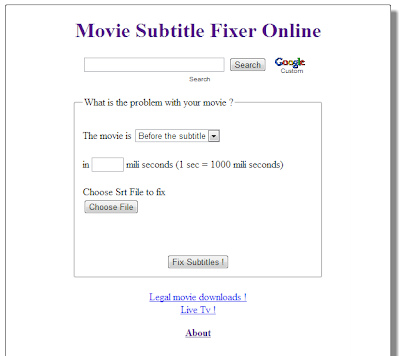
  • First of all visit www.subfixer.com

  • Select whether the movie is before or after the subtitle

  • Then enter the time difference of your subtitle with movie

  • There you can see the option to upload the subtitle, which you have.

  • Then click Fix Subtitles.


Now you will redirect to a sub page, where you can download the fixed subtitle without any cost. If you are using subtitle with a bad print, please don’t try this method. Because Bad movie Print always make the subtitle difference as the movie progresses.

Keep Visting And Share Us Too..!!

Get

Wednesday, August 3, 2016

How to Change Facebook Profile Name after Name Limits Reached Or Before 60 Days

How to Change Facebook Profile Name after Name Limits Reached Or Before 60 Days


Hellp TricksEdge Reader,
            Welcome Again On Our Site Today Here I Am With A Facebook Trick About How to Change Facebook Profile Name after Name Limits Reached Or Before 60 Days .

Mostly many people doesnt know that facebook keeps some limits for Pages, Profiles, Groups, Friends, Events etc. Just like we cant change a facebook profile name after 5 times, we cant change our profile username more than 1 time, we cant change a Facebook page name after 200 Likes, we cant change a facebook group name after reaching 250 members, we cant add more than 5000 friends to our facebook profile and it is not possible to change the name of an event if it has more than 5000 people invited.


Now-a-Days, many of us keeping their facebook profile names in Different stylish Fonts like ????L?ty ÞrîñçéNitesh I?e Bel??ve??? M?h-self???-?? ??????? ?? ??????????? ?????? etc. But facebook is banning the accounts who are using those type of stylish fonts, fake names.

Also make sure that your name cant include:

  • Titles of any kind (ex: professional, religious, etc)
  • Symbols, repeating characters or punctuation, unusual capitalization and numbers
  • Words, phrases, or nicknames in the place of a middle name
  • Offensive or suggestive content of any kind
  • Characters from multiple languages
   

As per facebook rules, the profile name which you use should be your real name as it would be listed on your credit card, student ID, govt-issued proof etc. So I personally suggest everyone to keep your facebook account with real name(without any fonts or special characters).

So if your profile name limit is exceeded and want to change your facebook profile name to real name, then Click Here 


Change Facebook Profile Name after Name Limits Reached:-

Fill that form and you have to upload your valid Government-issued Proof - photo ID like a Passport or Drivers license etc and when your upload finishes, finally click "Send" button.

Any 1 Proof will be enough in the list of below examples,
Examples:
  • Green card, residence permit or immigration papers
  • Birth certificate
  • Personal or vehicle insurance card
  • Marriage certificate
  • Official name change paperwork
  • Voter ID card
  • Non-drivers government ID (ex. disability, SNAP or national ID card)
Get