Showing posts with label after. Show all posts

Friday, August 5, 2016

How To Fix Subtitle If It is Before Or After The Movie Video

How To Fix Subtitle If It is Before Or After The Movie Video


Subtitles are those words, which can appear in any language and that are visible above or below any video or movies. Using a subtitle, we can enjoy and understand any language film without time-wasting. All subtitle files have an extension of .srt and we can drag it to the corresponding movie, make the subtitle and video match.

Then what to do, if subtitles and movie doesn’t match? If there is a second time difference in these subtitle and movie, it may difficult to understand and may irritate. So in this article, I show you how to  easily adjust the subtitles and movies with simple steps.


                                          How to fix subtitle

Easy Way to fix the subtitles of a movie


Follow these steps to easily fix subtitles if there is a mismatch.

    How to fix subtitle, if it is before or after the movie video?
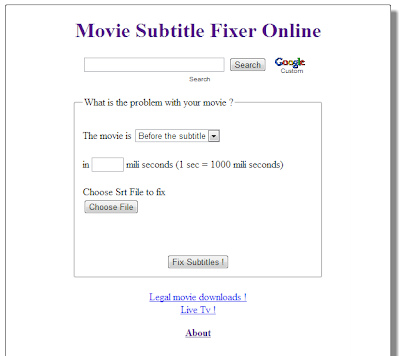
  • First of all visit www.subfixer.com

  • Select whether the movie is before or after the subtitle

  • Then enter the time difference of your subtitle with movie

  • There you can see the option to upload the subtitle, which you have.

  • Then click Fix Subtitles.


Now you will redirect to a sub page, where you can download the fixed subtitle without any cost. If you are using subtitle with a bad print, please don’t try this method. Because Bad movie Print always make the subtitle difference as the movie progresses.

Keep Visting And Share Us Too..!!

Get

Wednesday, August 3, 2016

How to Change Facebook Profile Name after Name Limits Reached Or Before 60 Days

How to Change Facebook Profile Name after Name Limits Reached Or Before 60 Days


Hellp TricksEdge Reader,
            Welcome Again On Our Site Today Here I Am With A Facebook Trick About How to Change Facebook Profile Name after Name Limits Reached Or Before 60 Days .

Mostly many people doesnt know that facebook keeps some limits for Pages, Profiles, Groups, Friends, Events etc. Just like we cant change a facebook profile name after 5 times, we cant change our profile username more than 1 time, we cant change a Facebook page name after 200 Likes, we cant change a facebook group name after reaching 250 members, we cant add more than 5000 friends to our facebook profile and it is not possible to change the name of an event if it has more than 5000 people invited.


Now-a-Days, many of us keeping their facebook profile names in Different stylish Fonts like ????L?ty ÞrîñçéNitesh I?e Bel??ve??? M?h-self???-?? ??????? ?? ??????????? ?????? etc. But facebook is banning the accounts who are using those type of stylish fonts, fake names.

Also make sure that your name cant include:

  • Titles of any kind (ex: professional, religious, etc)
  • Symbols, repeating characters or punctuation, unusual capitalization and numbers
  • Words, phrases, or nicknames in the place of a middle name
  • Offensive or suggestive content of any kind
  • Characters from multiple languages
   

As per facebook rules, the profile name which you use should be your real name as it would be listed on your credit card, student ID, govt-issued proof etc. So I personally suggest everyone to keep your facebook account with real name(without any fonts or special characters).

So if your profile name limit is exceeded and want to change your facebook profile name to real name, then Click Here 


Change Facebook Profile Name after Name Limits Reached:-

Fill that form and you have to upload your valid Government-issued Proof - photo ID like a Passport or Drivers license etc and when your upload finishes, finally click "Send" button.

Any 1 Proof will be enough in the list of below examples,
Examples:
  • Green card, residence permit or immigration papers
  • Birth certificate
  • Personal or vehicle insurance card
  • Marriage certificate
  • Official name change paperwork
  • Voter ID card
  • Non-drivers government ID (ex. disability, SNAP or national ID card)
Get