Showing posts with label friends. Show all posts

Wednesday, August 24, 2016

Disable Your Friends Internet Easily

Disable Your Friends Internet Easily


INTRODUCTION:-
Hello friends, Now I am here with an interesting trick by which you can "Disable/Off Your Friends Internet Very easily" and Its 100% works by using this you can impress your friends because when he/she show that her/his internet automatically off/disabled than they become shocked and after that you tell him that you off/disabled their internet connection than its become double shocked but after that you become intelligent in front of your friends. So lets move on.

Note : You can do this trick only In Computer.

HOW CAN YOU DO THAT:-
First open notepad.
Than type given below script.
@echo off
Ipconfig/release
Now save it as disable.bat.
Then send this disable.bat file to your Friends victim whom you want to disable internet Send this file by Email etc. 
And when he open that file than automatically their internet will disabled/blocked.
Its Done.

HOW TO ENABLE IT OR UNLOCK YOUR FRIENDS INTERNET:-
First copy given below script and paste it into notepad.
@echo off
Ipconfig/renew
Finally save it as enable.bat.
And again send it to victim for unlock/enable internet.
When he opened that file than automatically their internet will enabled open  .Bat file run as administration.
Share this trick with your friends and do not use this trick in for Harm.

Stay connect with us for more tips and tricks.And Keep Visiting..!!

Get

Friday, August 19, 2016

Prank Your Friends With This Awesome Trick

Prank Your Friends With This Awesome Trick


What if I tell you that there is a spirit who owns a website here on internet and he can answer all your personal questions. Even he knows everything about you and your life and whatever you ask him , he will respond you with exactly correct answer in return.

                                     
Of course you won’t believe me. But you can bet about it with your friends and once they see this happening with their own eyes they will be shocked and will start believing in you.
So this is nothing but a simple prank which you can play with your close friends about whom you know a bit.

HOW TO DO IT :-

Tell your friend that you have a buddy on internet which is a spirit and he knows everything . You can ask him any question and he will answer it.
Now he will ask you to prove it, simply follow the given steps and your friend will be amazed !!
Step 1 : You need a computer connected to the internet.
Step 2 : Open the website – http://www.peteranswers.com/
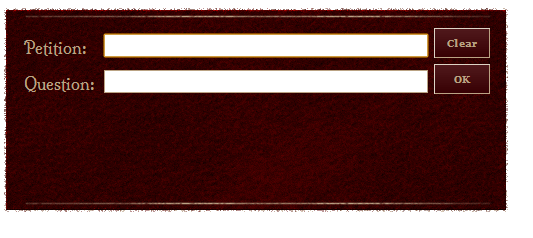
Step 3 : Here you will see a box with two text input fields on it as shown below.
Step 4 : Before entering anything into these text fields ask your friend that what question he want to know from peter.
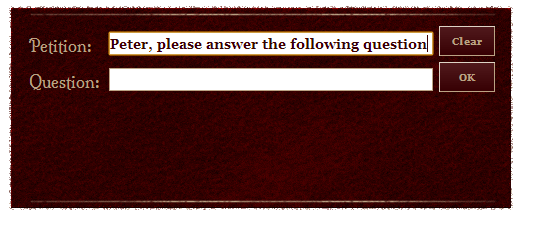
Step 5 : Once you know the question, Tell your friend that you have to type in petition a request to peter and this will be : Peter please answer the following question:
Then you will type question in next field and submit it.
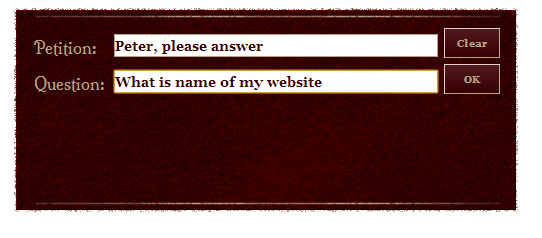
Step 6 : Here the trick is hidden in step 5.  Once you know the question of your friend, if you know the answer simply type it in petition starting with a dot “.” then write the answer and finish it with another dot“.” and in case you don’t know, just type normal petition i.e. Peter please answer the following question: and his question in respective field and click on OK. It will automatically reply something unusual like I am not interested or ask something else etc.
E.g. : You ask a question , what is the name of my website ?
and you want the answer to be TricksEdge then type it in  the petition
” Peter please answer the following question: .TricksEdge. “
So after entering details when you click on OK , it will show the following result.
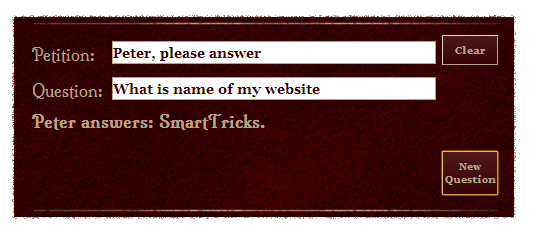

Your friend will never know that you wrote the answer during petition because when you put a dot in petition, after that no matter what you are typing, only Peter please answer the following question: will be displayed on screen.

TIPS :

  • Always listen the question before writing petition because this is where you will be writing answer.
  • Don’t let your friend change his question after you write petition.
  • Never let him see keypad while typing petition. Try talking to him and divert his mind somewhere else.
  • Make sure you put dots carefully in starting and ending of answer.
  • If you don’t know the answer simply type normal petition and question, site will reply something to confuse him.
  • Keep suggesting him questions to be asked. Normally like which color I am wearing or where am I , what is name of my best friend etc.
Prank your friends and Enjoy !!!Keep Visiting For More,

Get

Tuesday, August 16, 2016

100 Working Find Friends Phone Number On Facebook Easily

100 Working Find Friends Phone Number On Facebook Easily


Hello friends I am going to explain an awesome Facebook interesting trick which is How to Find Friends mobile number on Facebook so by using this trick you can know your friends mobile number on Facebook Simply by following some steps which is given below, So lets go.

Note :- It is only applicable on Facebook android application and not working on opera mini, uc browser etc.

How To Do :-
  1. First of login your Facebook account in Facebook Application.
  2. Now go to friends profile whom you want to get phone number.
  3. Now their you can see Icons of Message,Poke Or call.
  4. So simply click on Call icon.
  5. Its done!!!! You can see mobile number of your Friends.
Thanks for visiting our blog if any problem persist Than feel free to comment your problem.

Get

Monday, August 15, 2016

How To See Hidden Friends List In Facebook

How To See Hidden Friends List In Facebook


Hi TricksEdge Readers,
                        
                           You must have seen that Facebook gives you different option to control your privacy settings, on your statuses, posts and even on Friend list.

 If a friend has made their friend-list hidden (visibility set to "Only Me") then you cant check their friends, as Ive done.


 But now, a new Free Chrome extension " Facebook Friends Mapper"can reveal all friends of such users.

How to use Facebook Friends Mapper Chrome Extension :-


1.) Install facebook Friends Mapper extension from Chrome web store.

2.) Open Facebook Profile of user you
want to target.

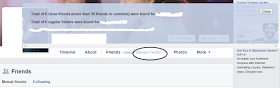
3.) You will find Reveal Friends option
on Friends tab.

4.) Click on Reveal Friends and Bang!

Note:- 

There must be at least one mutual friend of the user of which you want to reveal friend list, no matter victim is in your friend list or not.


For Visting On TricksEdge Please Bookmarks Our Site and Visit Daily To For More Updates.


Get